
AI news · October 12, 2026
AutoSprite turns one character sprite into a game animation sheet
AutoSprite turns one sprite or a prompt into idle, walk and run animations, then exports PNG sheets and atlases for Unity, Godot and other engines.
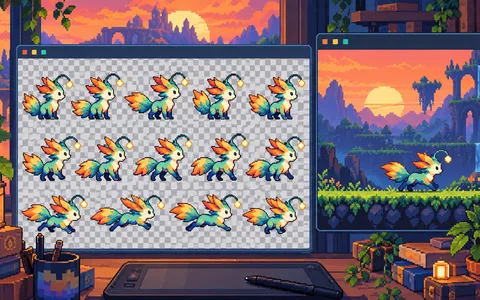
AutoSprite is aimed at the awkward middle of game production: a maker has a character design but needs a consistent set of movement frames. Its site lets you upload one sprite or describe a character, then generate idle, walk and run cycles. A custom mode accepts keyframes or a reference, and exports include a PNG spritesheet plus an atlas or frame archive. The service lists support for Unity, Godot, GameMaker, Phaser and RPG Maker.
The extra angle is a model-tool connection: AutoSprite advertises MCP support for Claude Code, Cursor and Codex, so an agent can request art variations inside a build workflow. That is more useful than a generic image generator when frame count, transparency and naming must stay consistent. It still needs manual cleanup for silhouettes, hitboxes and unusual poses. The honest comparison is an artist's first pass, not finished game art.
What you can do with it
Start with a single character reference, generate idle and walk cycles, and export the sheet into a throwaway Godot or Unity scene. Check frame alignment, transparent edges and license terms before using it in a paid game. The MCP route is worth testing only after the manual export is reliable.
Our take
AutoSprite has a clear job and a clear output format, which gives it a better chance than a general image toy in a real production loop. The catch is that animation consistency is easy to show and hard to ship. A two-minute preview can look good while collisions and repeated frames still need an artist.
Links Try it
Source: AutoSprite / The Neuron — Made With Models writes the brief; the reporting is theirs.